PrivJet Ops free for operators
Sell empty legs, quote on charter requests, plan fleet and availability, prepare flights. All in one system, with no subscription and no commission.
Ready in three steps
- 1
Sign up
Create your company; we review your details and activate the portal.
- 2
Fleet and legs
Add aircraft, base and hourly rate, publish empty legs by form, CSV or API.
- 3
Answer requests
Client requests arrive by WhatsApp, Telegram, SMS or email. You reply right there.
PrivJet Ops in 8 minutes
Every feature at a glance, shown in the live demo: drag and drop scheduling, crew with FTL, documents, flight watch, maintenance, quote to invoice.
What PrivJet Ops looks like
Real screens from the live demo with sample data. Click in, no sign-up needed.
What does it cost? Nothing.
We earn the client’s service fee: 5% on charter requests and 10% on empty legs, on top of the flight price. You receive the price you set. No subscription, no commission.
- Your flight price: paid to you in full
- €10,000
- Service fee: paid by the client on top, to PrivJet
- €1,000
- The client pays in total
- €11,000
- You receive
- €10,000
What PrivJet Ops does
Everything in one portal at no extra cost. Tap a feature for details.
Sell
Empty legs, charter requests and bookings with a pre-contract.
Free for operatorsNo subscription, no commission on your price. The client pays our service fee on top.Details
PrivJet Ops costs operators nothing: no subscription, no setup, no commission. We earn the client’s service fee: 5% on charter requests and 10% on empty legs, on top of the flight price. You receive your full flight price.
Example: you offer an empty leg for €10,000. The client pays €10,000 to you and a €1,000 service fee to PrivJet.
- Every feature on this page at no extra cost
- API access for your own data free of charge
- Cancel any time, data export on request
List and sell empty legsPublish empty legs by form, CSV or API. After your first five they go live instantly.Details
Add empty legs in the portal, upload a CSV file or send them through the API. We review your first five legs; after that they go live immediately. An automatic plausibility check always runs (airports, date, price range, seats per class, duplicates, runway length).
Your legs appear on privjet.net, in the PrivJet app for iOS and Android, in our AI concierge on WhatsApp and Telegram and in our clients’ route alerts, who are notified as soon as a matching flight appears.
- Form, CSV upload or API
- Runway check for departure and destination
- Booking requests go to you as the provider only
Bookings with a signed pre-contractThe client signs and pays the service fee before learning your name.Details
When a client books your empty leg, they first sign a pre-contract. You confirm with registration, crew, meeting point and payment method. Only after the client has paid the service fee do they see your name, the registration and your bank details.
The client pays the flight price directly to you, by bank transfer or by card through your own Stripe account. The passenger list arrives 24 hours before departure; reminders and deadlines run automatically.
- Signed pre-contract with PDF
- Identity and registration revealed only after the service fee is paid
- Flight price paid directly to you
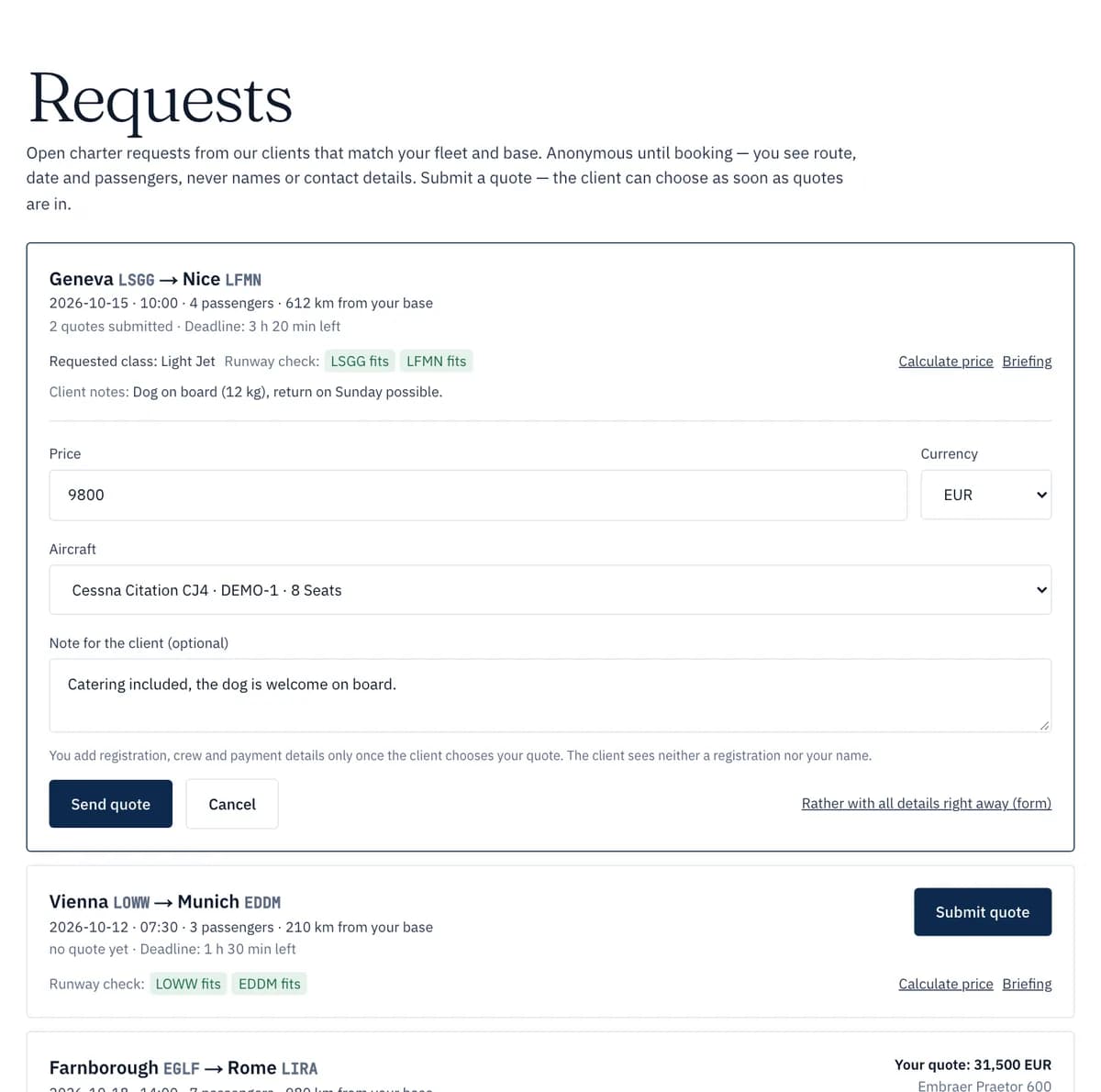
Request marketplaceSee and quote every charter request in your region, including the ones we don’t email you about.Details
When a client searches a route without a matching empty leg, it becomes a charter request. In the portal you see every open request departing within 2,500 km of your base for which your fleet has enough seats. Anonymous, with route, date, passengers and the client’s notes.
You quote right in the list: price, aircraft from your fleet, note. Done. You add registration, crew and payment details only once the client chooses your quote. You can update or withdraw it while the request is open; the same works through the API. A runway indicator shows at once whether departure and destination suit your aircraft.
- Quote in seconds: price + aircraft
- Anonymous until booking
- Runway indicator and briefing per request
- Notifications for new matching requests
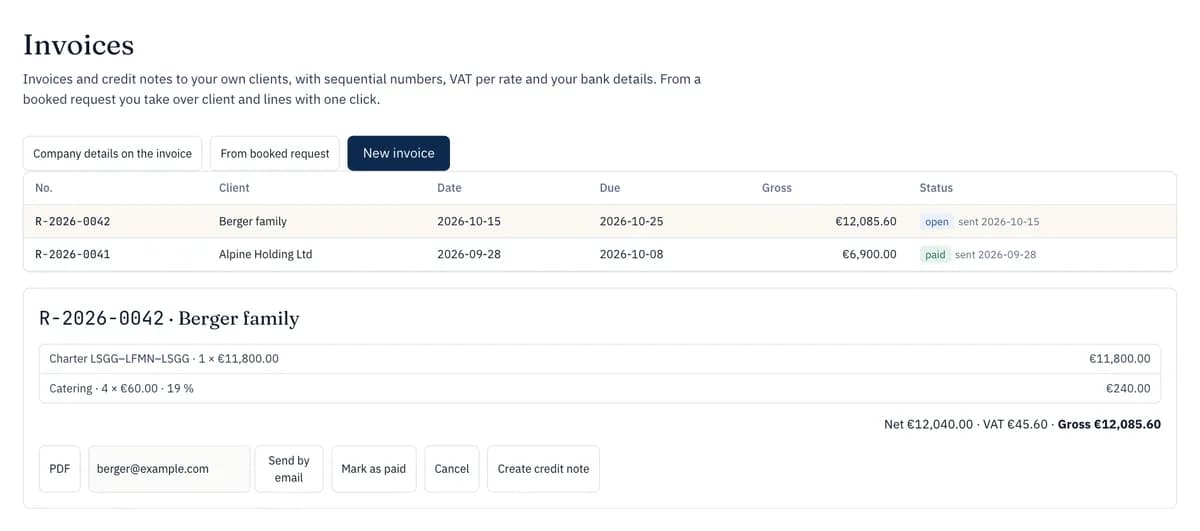
Invoices and credit notesInvoices to your own clients with sequential numbers, VAT per rate and bank details, as PDF and by email, corrected by credit note.Details
From a booked request you take over client and lines of the chosen quote, without cost and margin. Or you issue a blank invoice. PrivJet Ops sets number, date, service date and payment term, and your company details come from the legal notice of your website.
The PDF goes to the client as an attachment and replies reach you. Paid, overdue and cancelled show in the list; you correct a sent invoice in full or for single lines with a credit note.
- Sequential number per year
- VAT per rate, reverse charge
- From a booked request
- PDF and sending by email
- Credit note
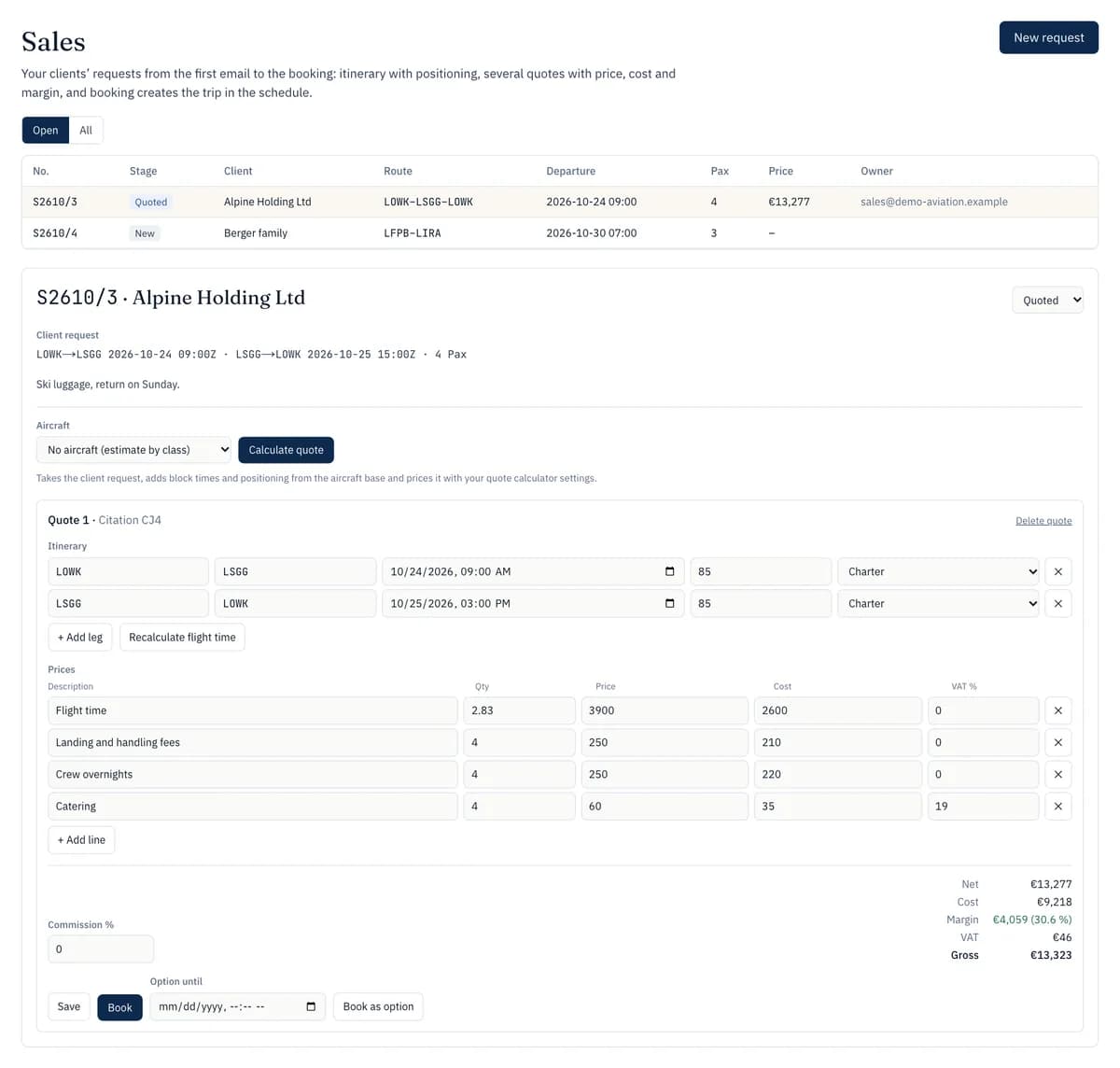
Sales: request to bookingYour own clients’ requests with stages, several quotes with itinerary, price, cost and margin, and one click creates the trip in the schedule.Details
Each request moves through new, quoted, option, booked and done, or lost with a reason. Quotes are calculated from the client request: block times, positioning from the aircraft base and prices from your quote calculator settings.
Price lines have quantity, price, cost and VAT; they give net, margin in money and percent, commission and gross. Book or book as option creates the trip with all legs in the schedule, and busy times show up at once.
- Stages and lost reason
- Several quotes per request
- Automatic positioning
- Cost and margin
- Booking creates the trip
Card payments through your own Stripe accountClients pay the flight price by card directly to you, with your own card surcharge if you like.Details
Connect your own Stripe account with the full dashboard. Clients then pay by card directly to you; the service fee stays separate. You set a card surcharge of 0 to 4 % yourself. It is entirely yours. Bank transfer remains available.
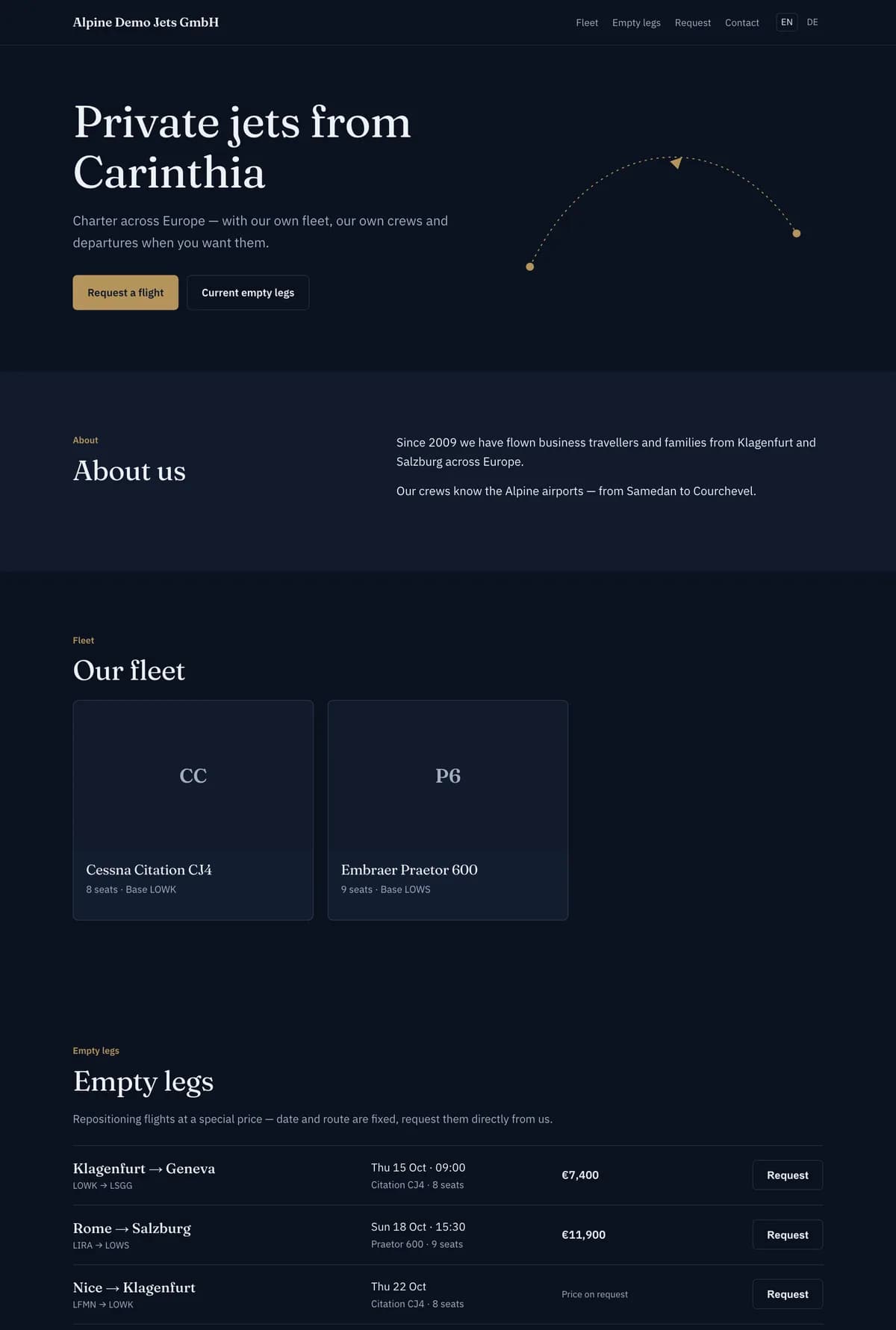
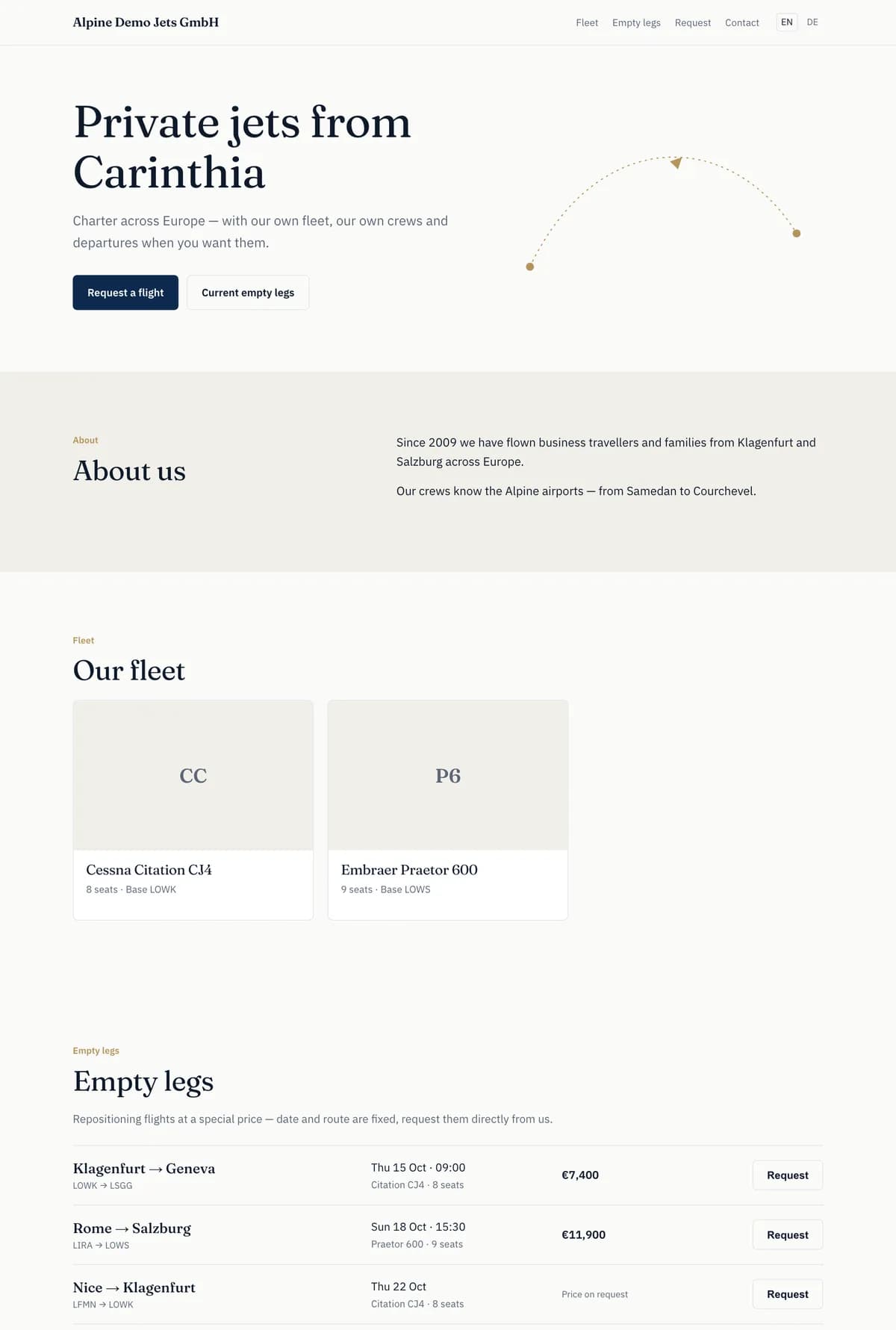
Your own operator websiteFree website with fleet, empty legs and request form at your-name.privjet.net. Requests go straight to you, no fee.Details
Build your site in the portal under “Website”: template, colours, logo and images, texts in German and English, bases, safety and certificates, legal notice. Fleet and empty legs come from PrivJet Ops automatically and stay up to date. Registrations are only shown if you want.
The site runs with a certificate at your-name.privjet.net, is readable for search engines and shows a discreet “Powered by PrivJet Ops” at the bottom. Requests through the form go straight to you with no service fee, and your clients don’t enter our sales channel. Connecting your own domain (www.your-company.com) in the same editor is coming soon.
- Free, no fee on requests
- Fleet and legs always up to date
- German and English
- Widget, iframe and JSON/RSS feed for your existing website
- Own domain coming soon
Legs by email, WhatsApp or uploadSend a list, PDF or screenshot: we extract the legs, you confirm in one click.Details
Paste a list in the portal under “Import legs” or upload a PDF or screenshot. Or send the same from your login address to [email protected], or as a message on your connected WhatsApp or Telegram channel.
We read route, date, time, aircraft, seats and price and check every leg as if you added it yourself (airports, runways, price range, duplicates). You see which legs go live right away, which get a short review and where details are missing. Only what you confirm goes live.
- Text, PDF, PNG, JPG
- By email, WhatsApp, Telegram or upload
- Nothing live without your confirmation
- Also through the API
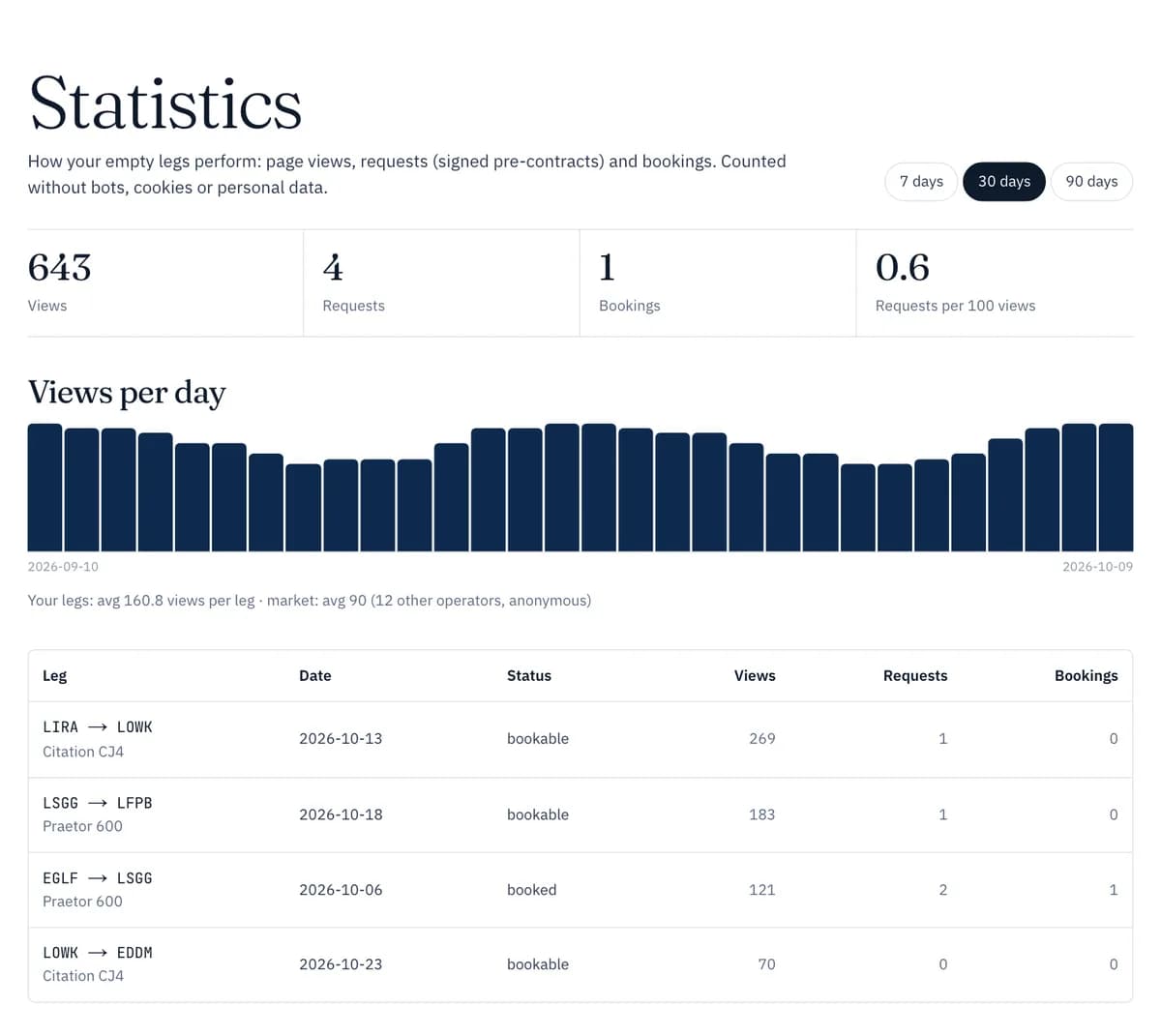
Statistics per empty legViews, requests and bookings per leg, with an anonymous market comparison.Details
For each of your empty legs you see how often its page was viewed, how many clients signed a pre-contract and how many of them booked, for 7, 30 or 90 days, plus views per day.
We count page views without bots, cookies or personal data. The market comparison (average views per leg) appears only once at least five other operators had views in the period, so no single competitor can be singled out.
- Views, requests, bookings per leg
- 7, 30 or 90 days
- Anonymous market comparison from five operators
- Also through the API
Plan
Fleet, calendar, briefing and quotes.
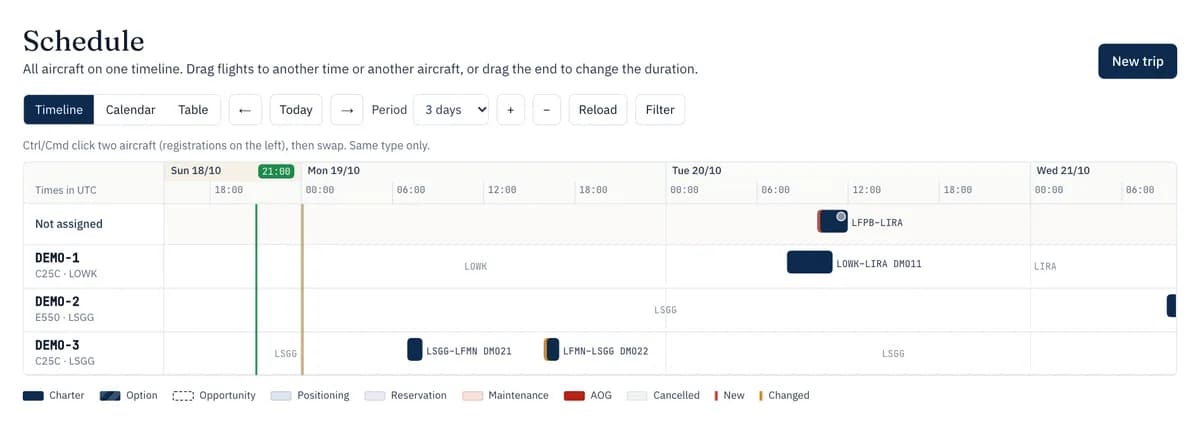
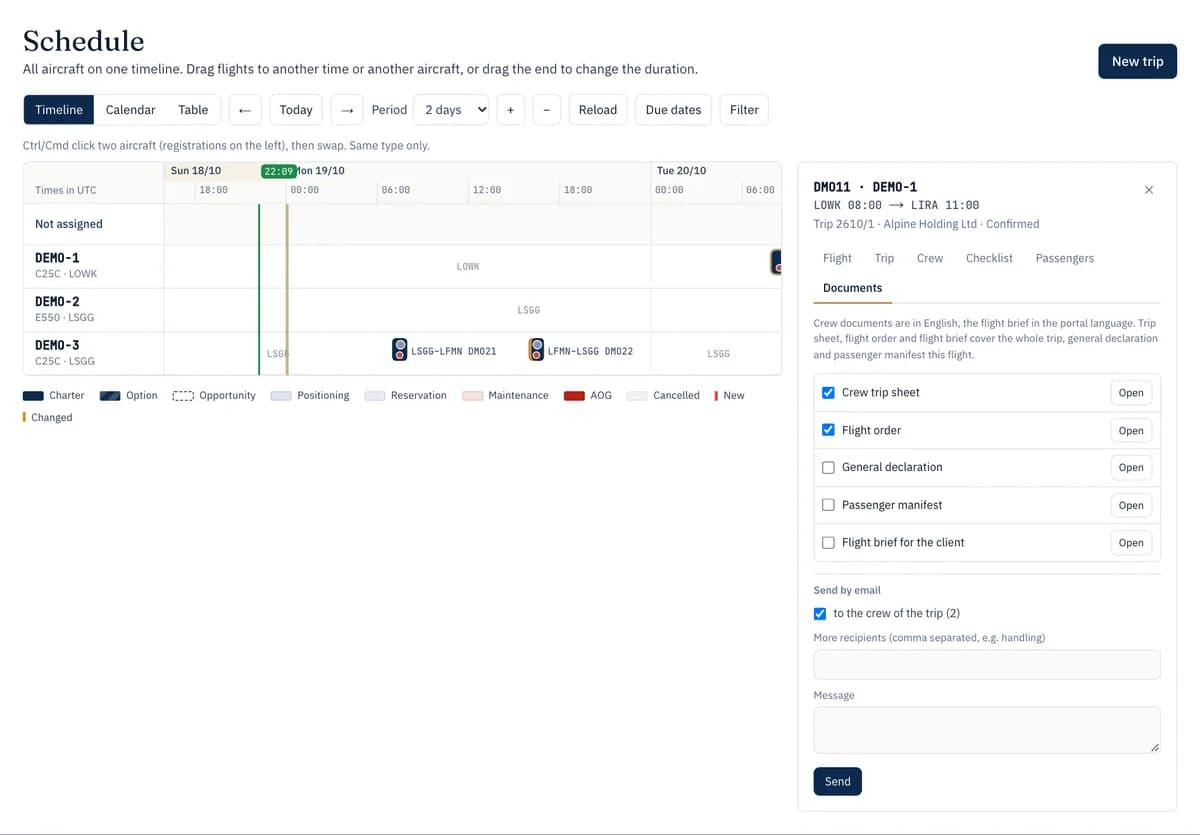
Schedule with timeline, calendar and tableYour whole fleet on one timeline: drag flights to another time or aircraft, swap aircraft and see conflicts at once.Details
Each aircraft has a row, time runs to the right and a line marks now. Drag a flight to another time or aircraft, drag its end to change the duration, or swap two aircraft of the same type. The portal asks before it saves, and you can undo for ten seconds.
Create trips with several legs right in the schedule, as option, opportunity or confirmed, even without a registration. Every flight shows whether it is new or changed, with checks for overlap, airport sequence, ground time, range, passengers, runway and NOTAM closures. Calendar and table views and day notes are included.
- Drag and resize
- Swap aircraft
- Trips, options, day notes
- Conflicts and checks
- Also via API
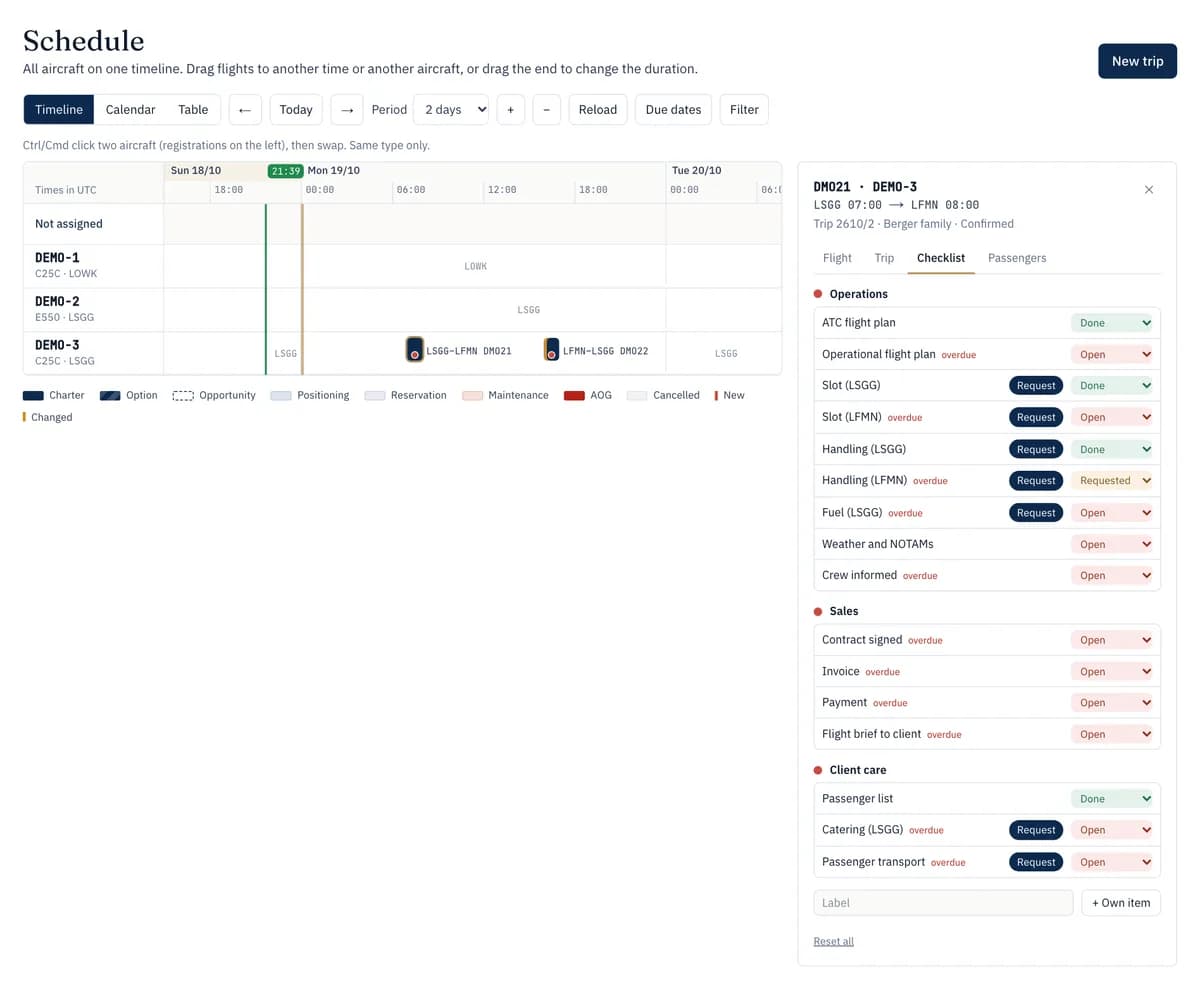
Trip panel with checklist per legFlight, trip, checklist and passengers in one side panel: tick off handling, slots, permits, catering and hotel or request them by email.Details
Every flight has tabs for flight, trip, checklist and passengers. The checklist builds itself per leg: flight plan, handling at both airports, slots at coordinated airports, landing permit for flights outside the EU, Switzerland and the UK, fuel, weather, crew hotel for night stops, catering and passenger list. Status lights per section show what is open, requested or done.
From each item you send a request by email with all flight details, and the reply comes straight to you. If time, route or aircraft change, handling and slots go back to "check". Due dates and a list of everything due are included, as are copying trips, adding legs and moving legs to a new trip.
- Checklist per leg with status lights
- Email request from the item
- Due dates across the fleet
- Copy and extend trips
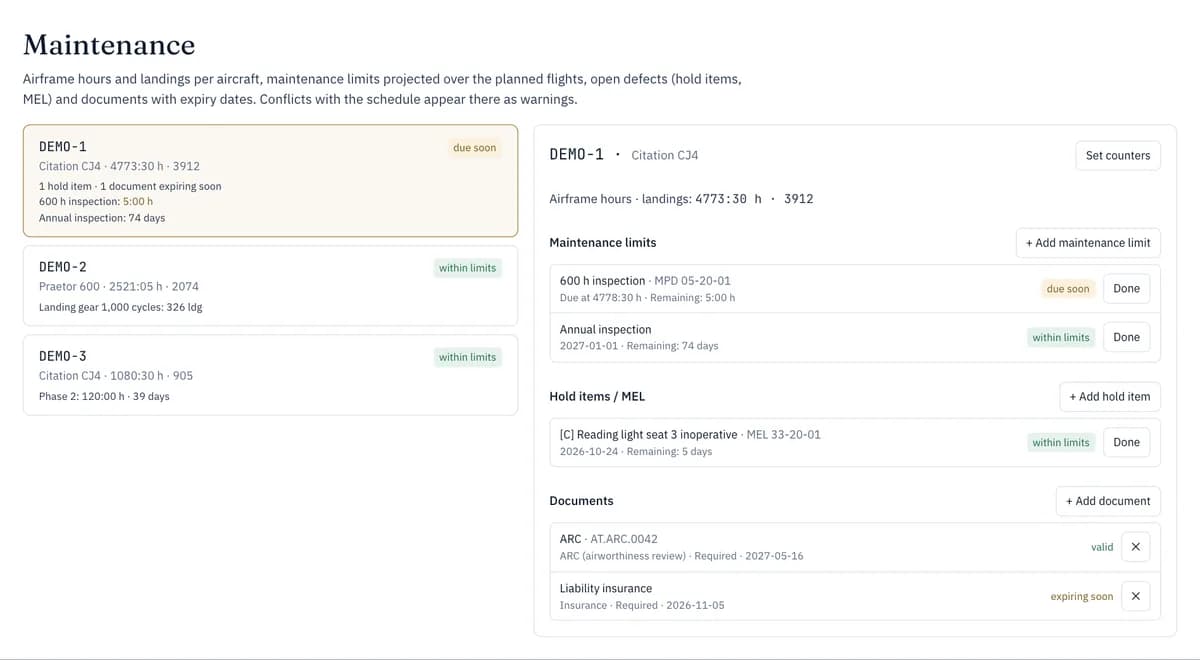
Maintenance: limits, hold items, documentsAirframe hours and landings per aircraft, maintenance limits projected over the planned flights, hold items by MEL category and documents with expiry dates.Details
For each inspection you enter the limit by hours, landings or date. PrivJet Ops projects where the counters will stand for every planned flight and warns in the schedule before a flight exceeds the limit. The counters grow with every closed journey log.
Open defects are kept as hold items with an MEL category, and the deadline follows from the category. Documents such as ARC, insurance or radio licence have an expiry date; if a required document has expired on the day of the flight, the schedule shows a warning. Reminders arrive 60, 30 and 7 days before.
- Airframe hours and landings
- Limits by hours, landings, date
- Projection over planned flights
- Hold items by MEL category
- Documents with reminders
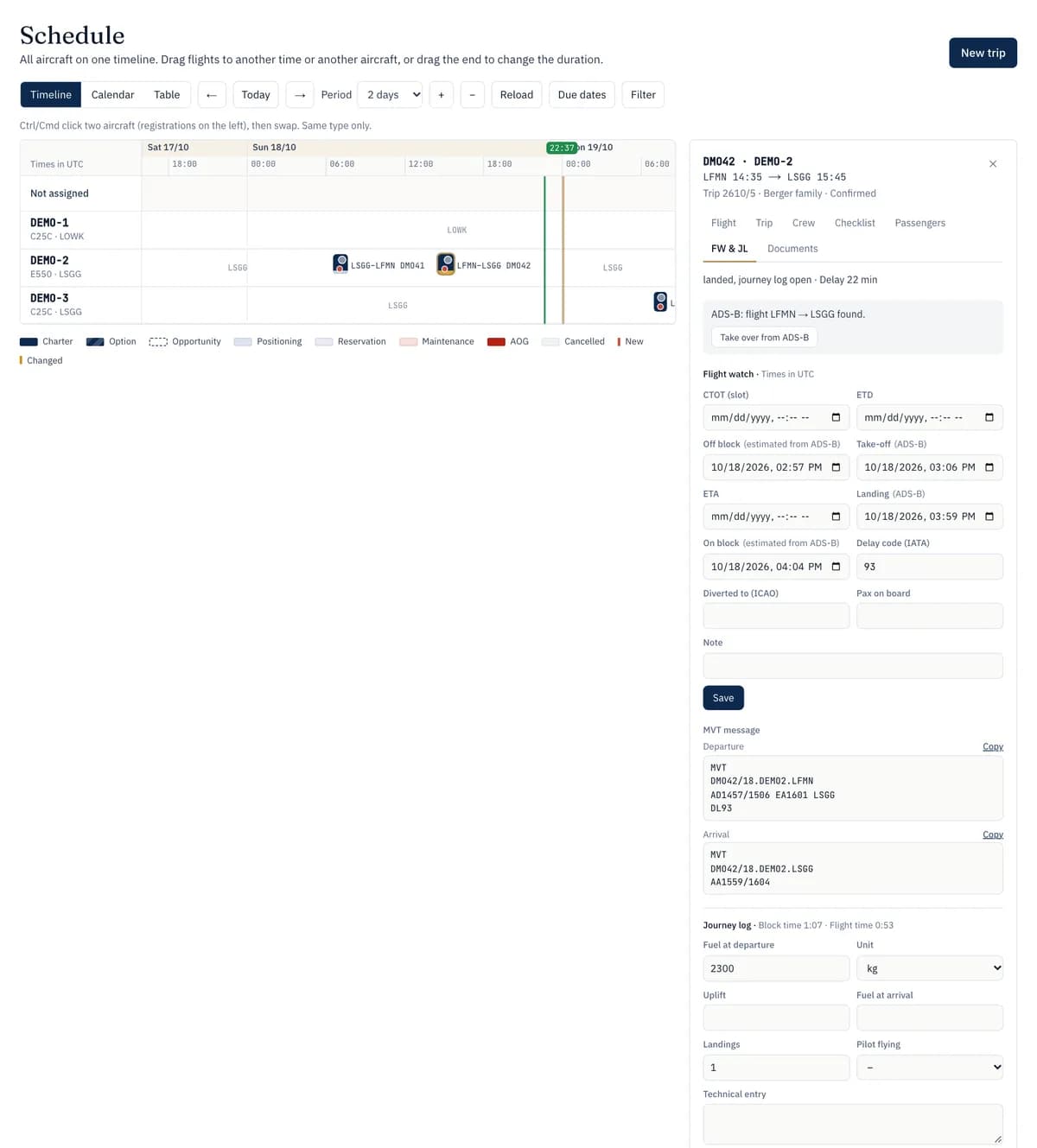
Flight watch and journey logTake-off and landing come from our own ADS-B reception, without typing. Plus MVT message, delay and a journey log that keeps airframe hours and landings up to date.Details
For every flight you record CTOT, ETD, off block, take-off, ETA, landing and on block. When our tracker sees your aircraft, take-off and landing fill in by themselves, off and on block are estimated with taxi times. Whatever you enter yourself stays.
The times produce an MVT message ready to copy. In the journey log you record fuel, landings and pilot flying; closing it locks the flight and adds flight time and landings to the aircraft. The schedule shows the state as a coloured stripe on the bar.
- Take-off and landing from ADS-B
- MVT message
- Delay from 15 minutes
- Journey log with sign-off
- Airframe hours and landings
Flight documentsCrew trip sheet, flight order, general declaration, passenger manifest and a flight brief for the client as PDF, one click from the flight.Details
Documents are built from what is in the schedule: aircraft, times in UTC and local time, crew with report time, handling per airport, codes from the checklist and passengers with travel documents. If something is missing, such as the crew or the passenger list, you see it beforehand.
Open a document or send several as attachments to the crew of the trip and to other recipients such as handling. When you notify the crew, trip sheet and flight order are attached automatically.
- Crew trip sheet
- Flight order with signature fields
- General declaration per ICAO Annex 9
- Passenger manifest with travel documents
- Flight brief for the client
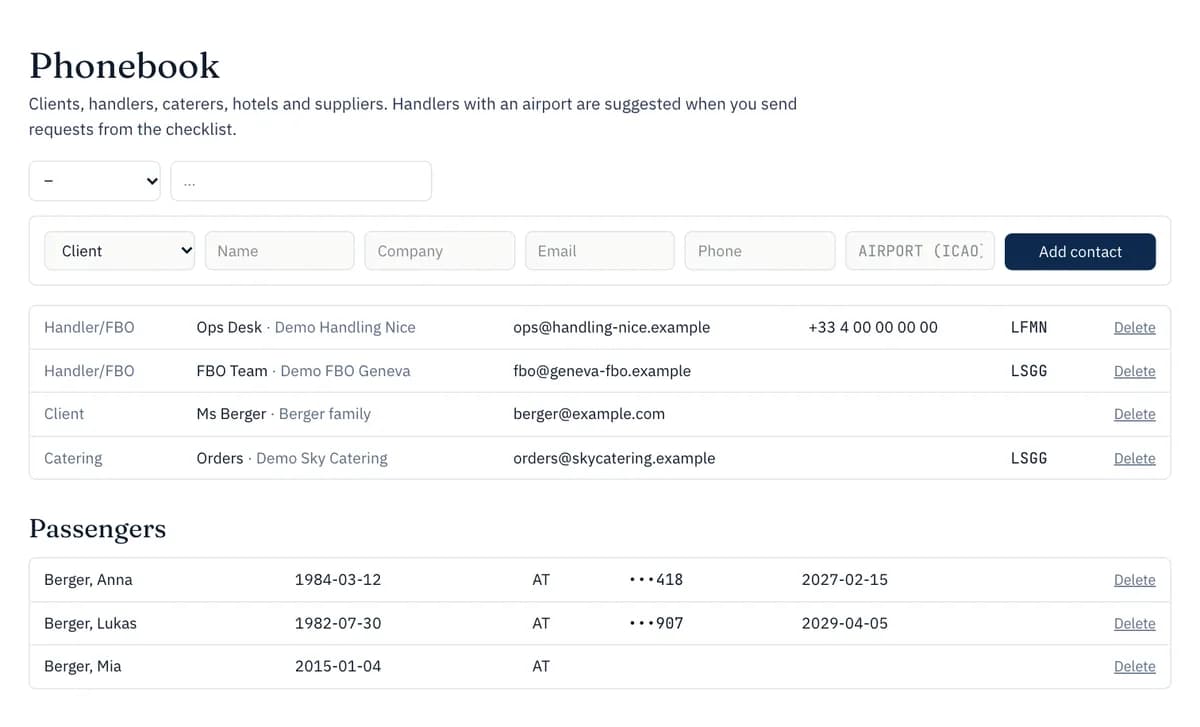
Phonebook and passenger databaseClients, handlers, caterers and hotels in one place, passengers with travel documents and a warning when a passport is not valid enough on the flight date.Details
Add clients, handlers, caterers, hotels and suppliers; the checklist suggests handlers with an airport when you send requests. Save passengers once and assign them to legs, optionally for the whole trip, or paste a list from an email.
Passport numbers are stored encrypted and shown only shortened. If a passport expires before the flight or within six months, you see it on the leg.
- Contacts by type and airport
- Passengers per leg and trip
- Passport number encrypted
- Paste a list from text
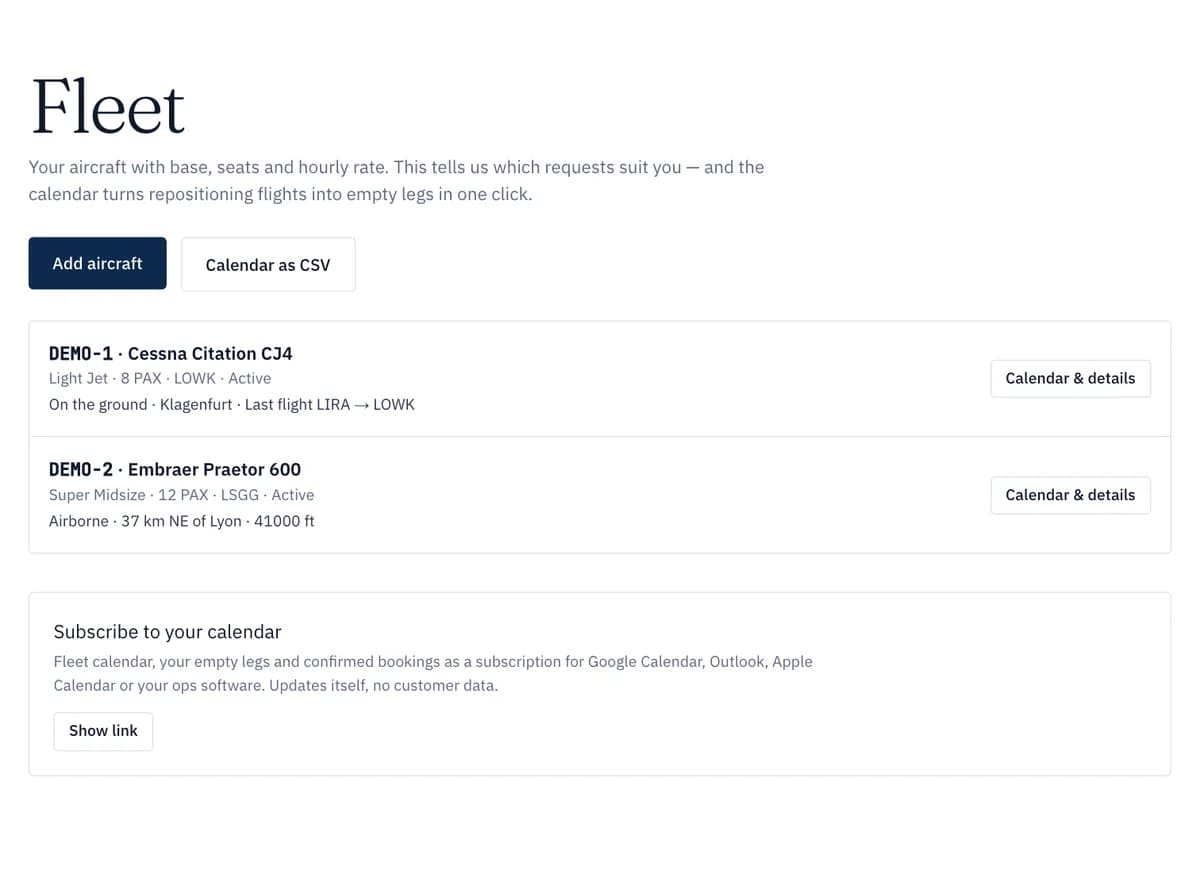
Fleet and availability calendarMaintain your fleet, plan availability and turn repositioning flights into empty legs in one click.Details
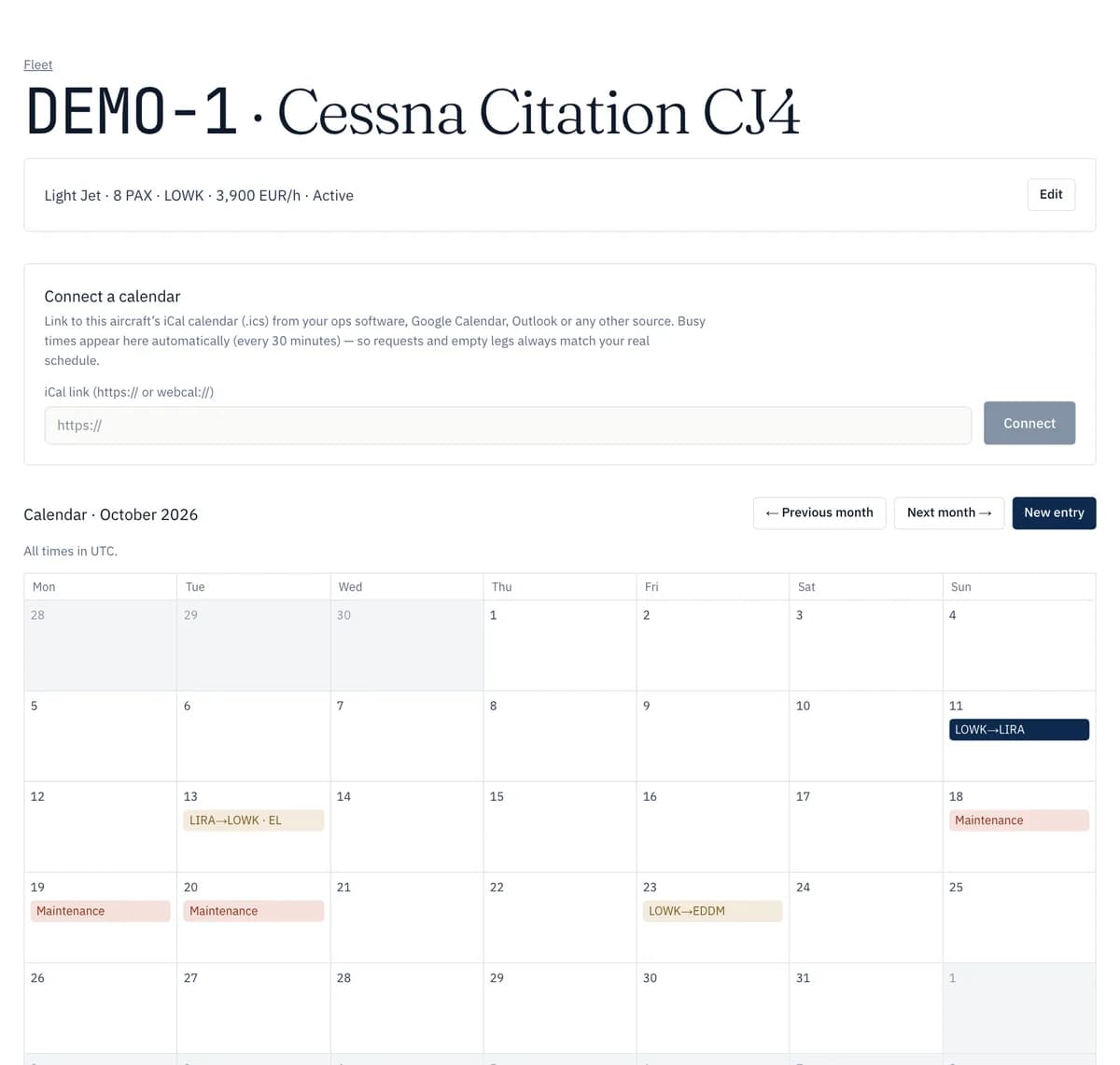
Add your aircraft with base, seats and hourly rate. This tells us which requests suit you. In the calendar you enter availability, charters, maintenance and repositioning flights; overlaps are prevented.
A repositioning flight becomes an empty leg in one click, when you add it or later.
- Registration stays internal
- Calendar via API too
- Repositioning → empty leg
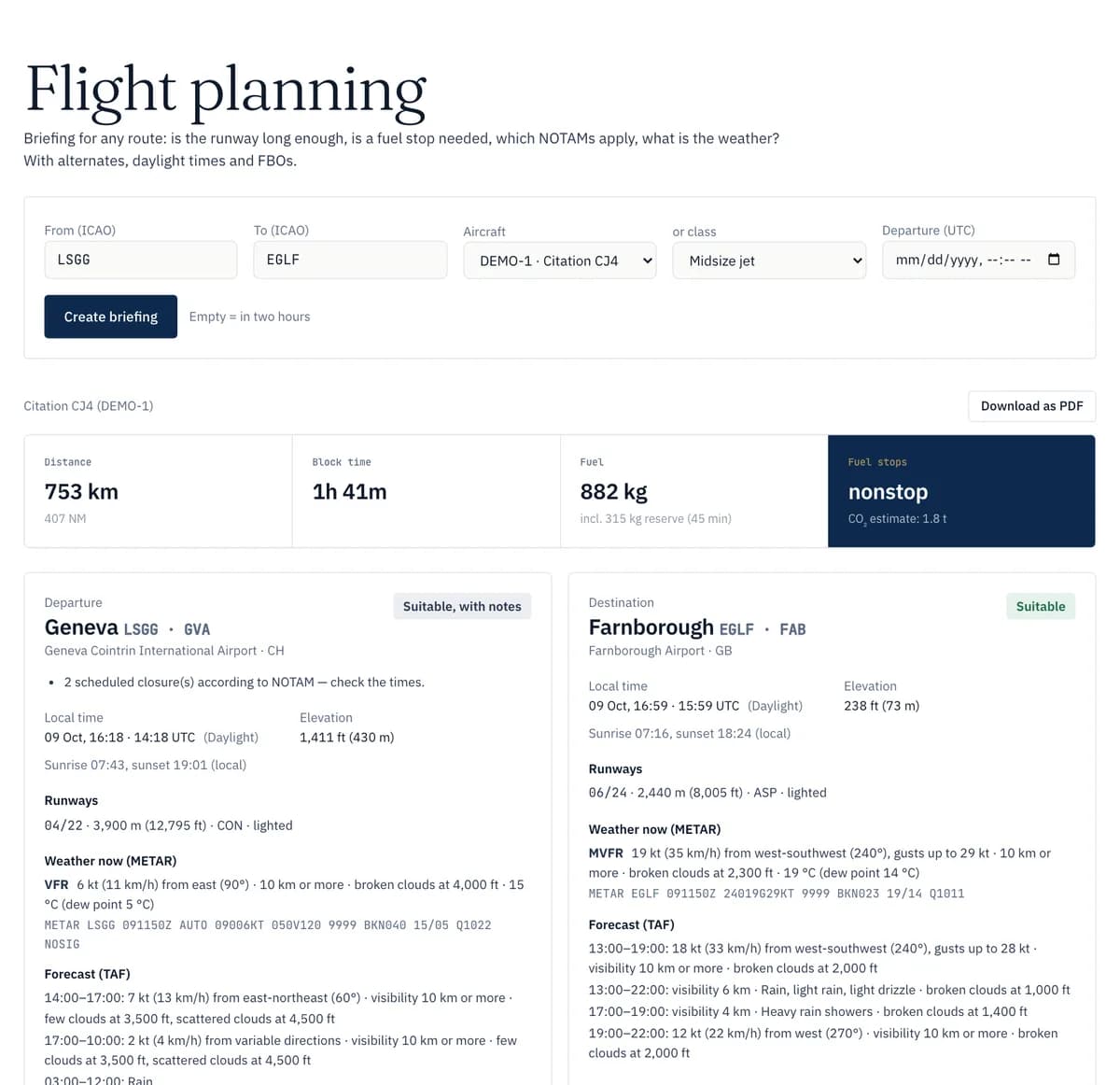
Flight planning and briefingRunway check, fuel stop, weather, NOTAMs, alternates and FBOs for any route, also as a PDF.Details
For any route the briefing shows whether the runway suits your aircraft (including elevation), whether a fuel stop is needed, which NOTAMs apply, the weather at departure and destination, sunrise and sunset and the available FBOs. With alternates and as a PDF.
The briefing is linked from every leg, request and contract in the portal. You can try a public version without signing up.
- NOTAMs explained in plain language
- Weather (METAR/TAF) and daylight times
- Fuel stop suggestion and alternates
Your fleet liveSee where your aircraft are right now, from public ADS-B data.Details
The fleet overview shows for each aircraft whether it is airborne or on the ground, where (nearest airport) and its most recent flight. Your clients see the estimated arrival on the day of the flight, only after they have paid and know the registration anyway.
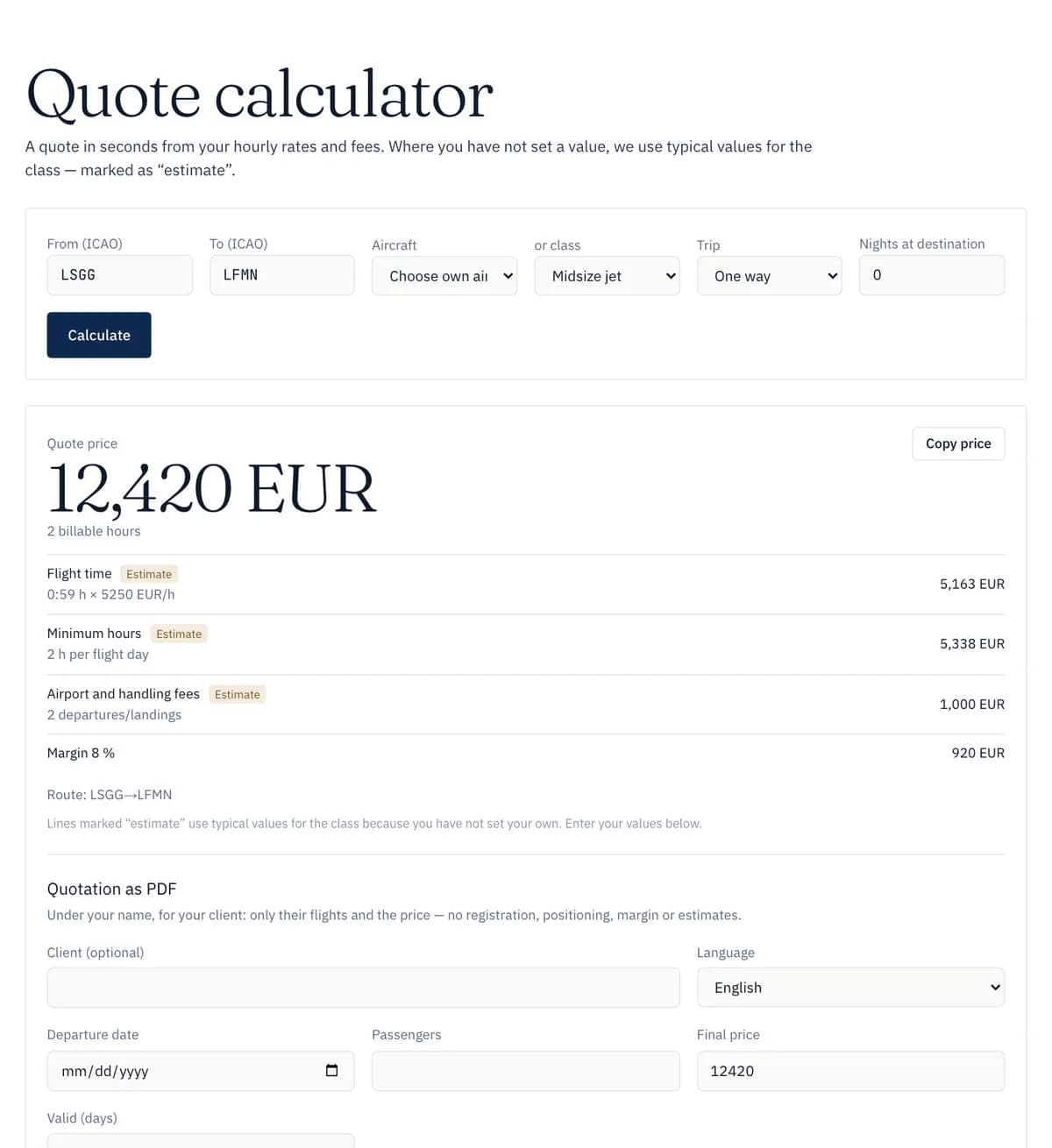
Quote calculatorQuotes in seconds from your hourly rates and fees. We estimate missing values and mark them clearly.Details
Pick route and aircraft and the calculator returns the quote price: flight time by class including fuel stops, positioning from and to your base (at the share you choose), minimum hours per flight day, fees per airport, crew overnights, extras and margin.
Where you have not set a value we use typical values for the class and mark the line as an estimate. On every request in the marketplace, “Calculate price” opens the calculator directly.
One click turns the result into a quotation PDF under your company name: the client’s flights with date and flight time, aircraft, price (itemised if you like), validity and a note, without registration, positioning flights, margin or estimates. English or German.
- Your rates and fees per airport
- Positioning and minimum hours
- Estimates clearly marked
- Quotation PDF under your name
Team and operations
Notifications, roles, crew and tips.
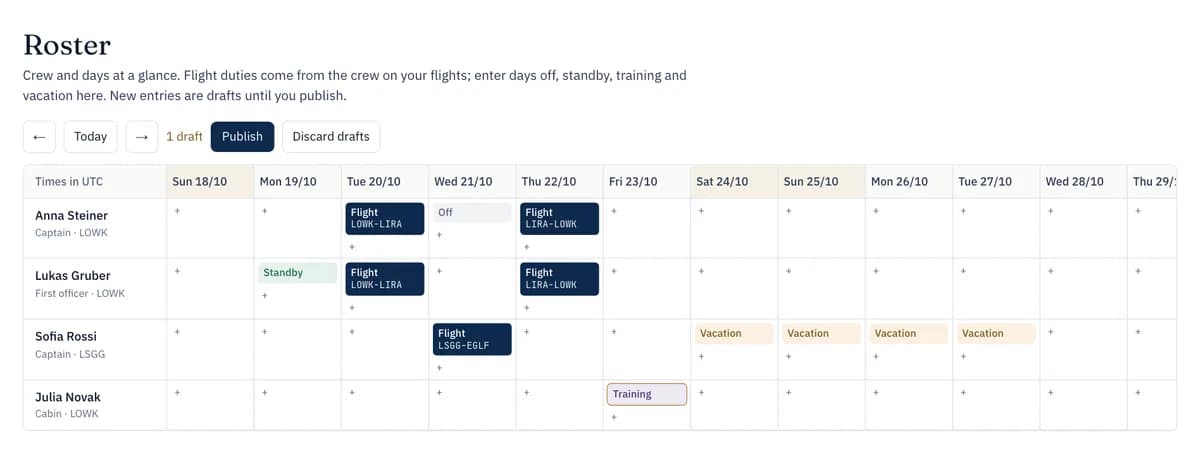
Crew on flights and rosterAssign crew per flight with checks of duty times, type rating and documents, and a roster with drafts and confirmation by the crew.Details
In the crew tab you pick a person for each position. Suggestions are sorted: without issues first, then based at the departure airport, then whoever flew less this month. Busy, off, vacation, missing type rating, expired licence, medical or passport show at once, plus an FTL preview for the assignment.
Flight duties are built from the assignments, and several legs on one day count as one duty with sectors. In the roster you enter days off, standby, training and vacation as a draft and publish it; the crew gets an email and confirms through a link without logging in.
- Suggestions with checks
- FTL preview
- Flight duties built automatically
- Draft and publish
- Confirmation by link
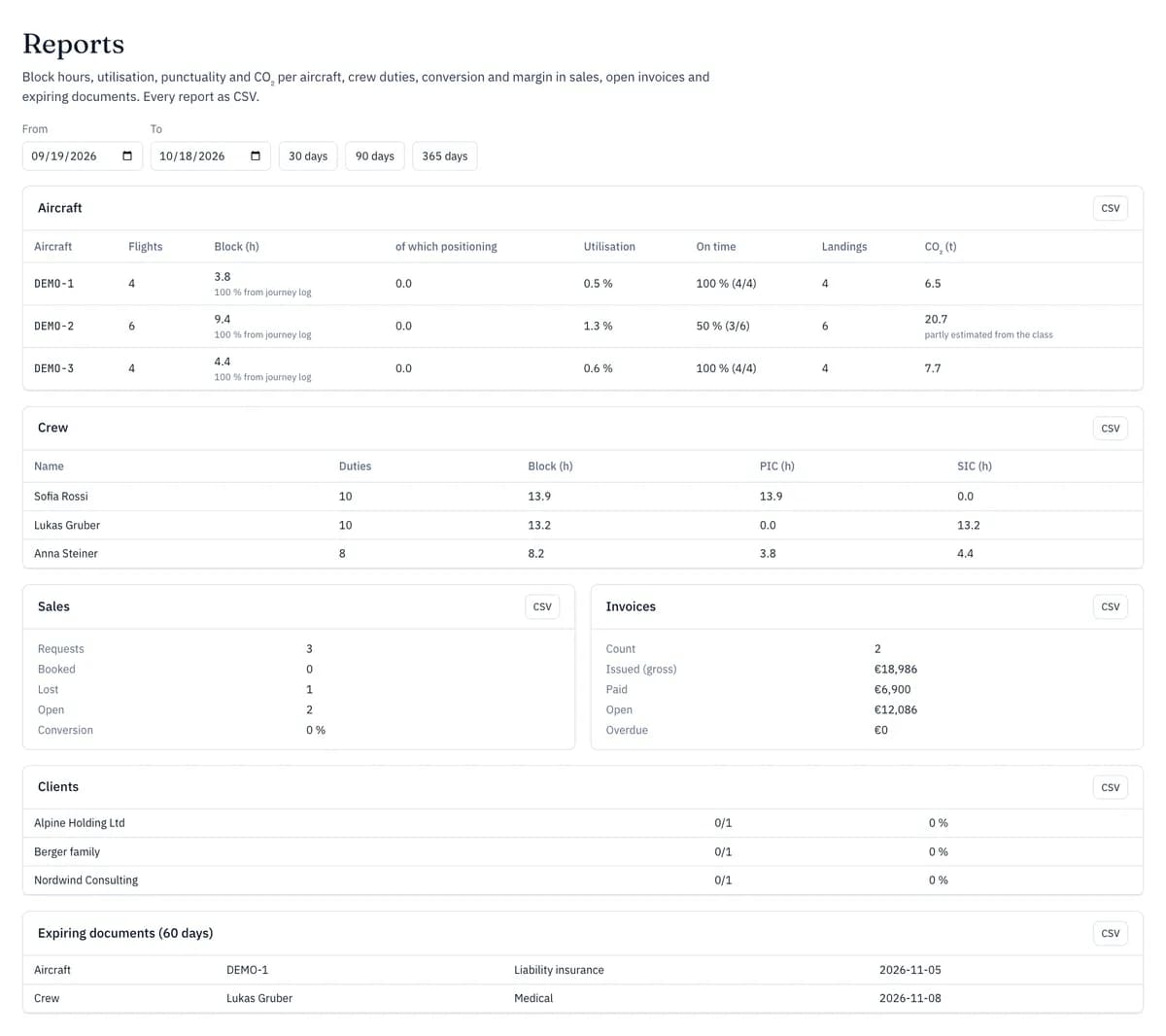
ReportsBlock hours, utilisation, punctuality and CO₂ per aircraft, crew duties, conversion and margin in sales, invoices and expiring documents, every report as CSV.Details
You choose the period and PrivJet Ops calculates from what is in the system: block time from the journey log, otherwise from the plan, punctuality with a 15 minute tolerance, CO₂ from fuel used or estimated from the class.
Plus block hours per crew member and function, requests, bookings and margin in sales with conversion per client, issued, paid and overdue invoices, and documents expiring in the next 60 days.
- Block hours and utilisation
- Punctuality
- CO₂ per aircraft
- Crew hours per function
- Sales, invoices, CSV
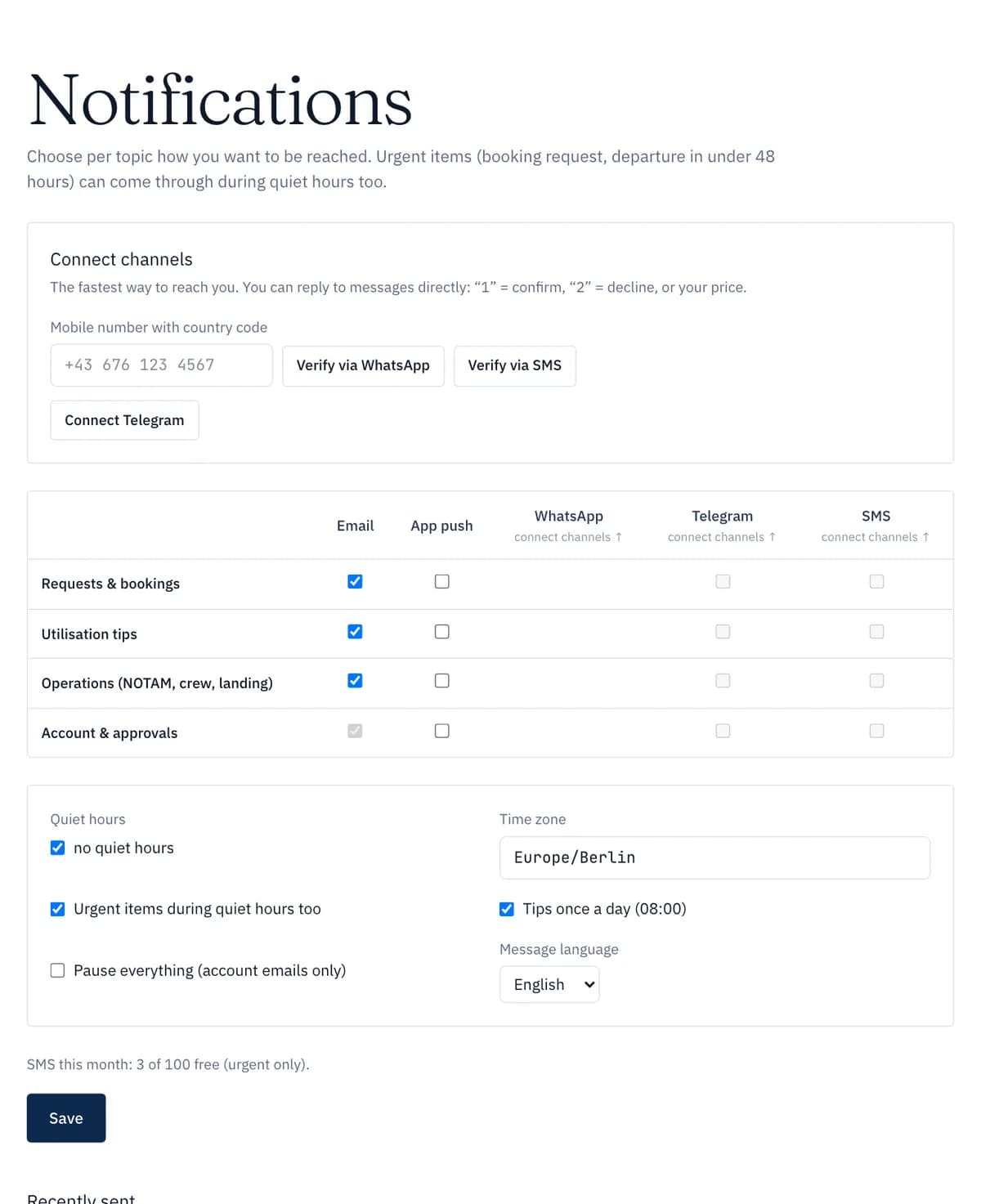
Notifications with in-channel repliesRequests and bookings instantly by email, WhatsApp, Telegram, SMS or push. You can reply right there.Details
Each team member chooses which messages arrive on which channel: email, WhatsApp, Telegram, SMS or push in the PrivJet app. With quiet hours in your time zone. Urgent items, such as a booking request departing within 48 hours, still get through if you want.
On WhatsApp and Telegram you reply directly: “1” confirms (you receive the link to the form), “2” declines, a price such as “12,500 EUR” is recorded as a quote. “STOP” pauses.
- Configurable per event group and channel
- Quiet hours and daily digest
- SMS allowance for urgent items included
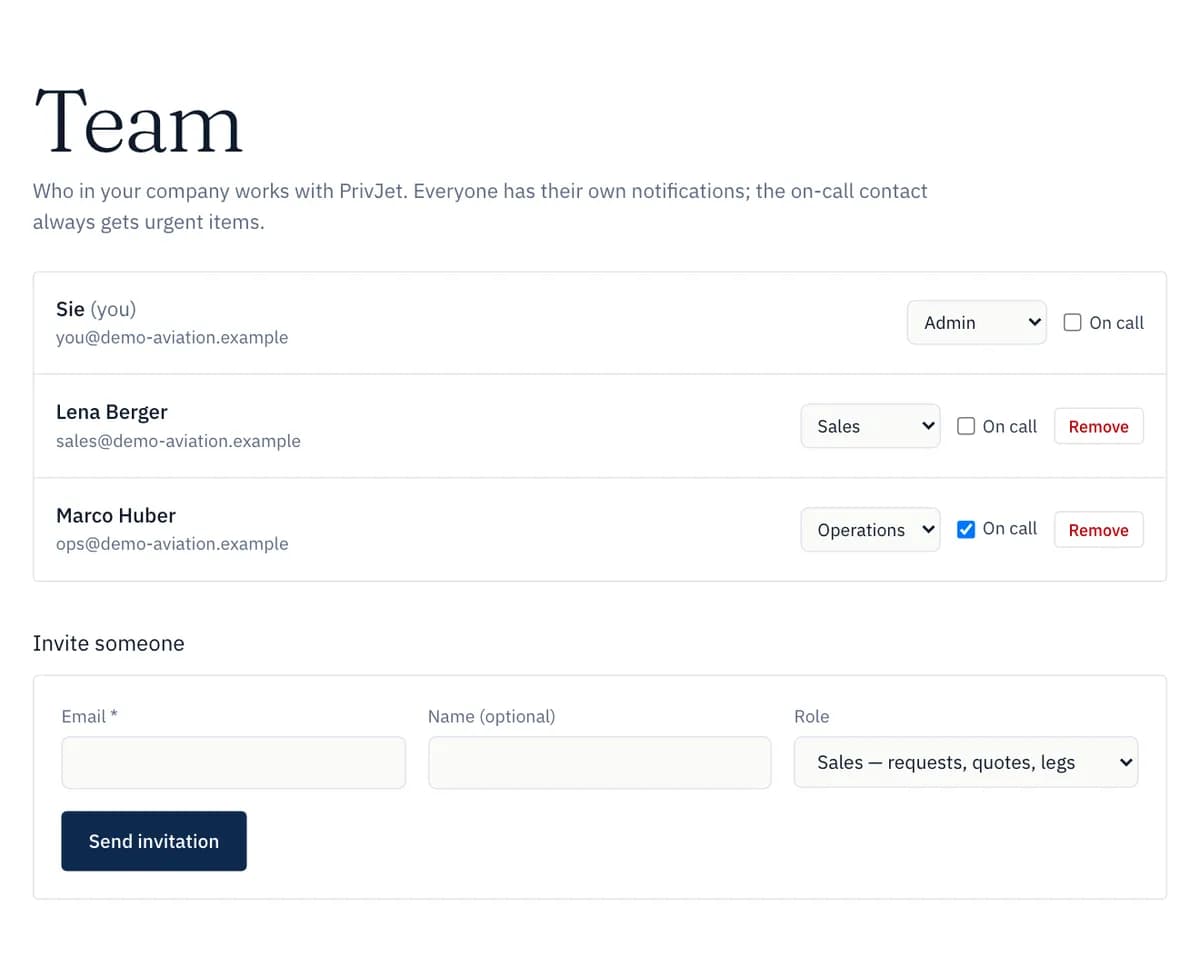
Team and rolesInvite colleagues, assign roles and set an on-call contact.Details
Invite your team: admin (everything), sales (requests, quotes, bookings), ops (fleet, calendar, legs) or read-only. Each member has their own channels and quiet hours. Whoever is on call always receives urgent items.
Utilisation tipsHints where you can sell more, once in the morning in your daily digest.Details
We tell you when a leg has had no request for days (with the market average of comparable offers on the same route), when a leg departs soon, when a repositioning flight is not yet listed as an empty leg and when clients are watching routes from where your aircraft is available.
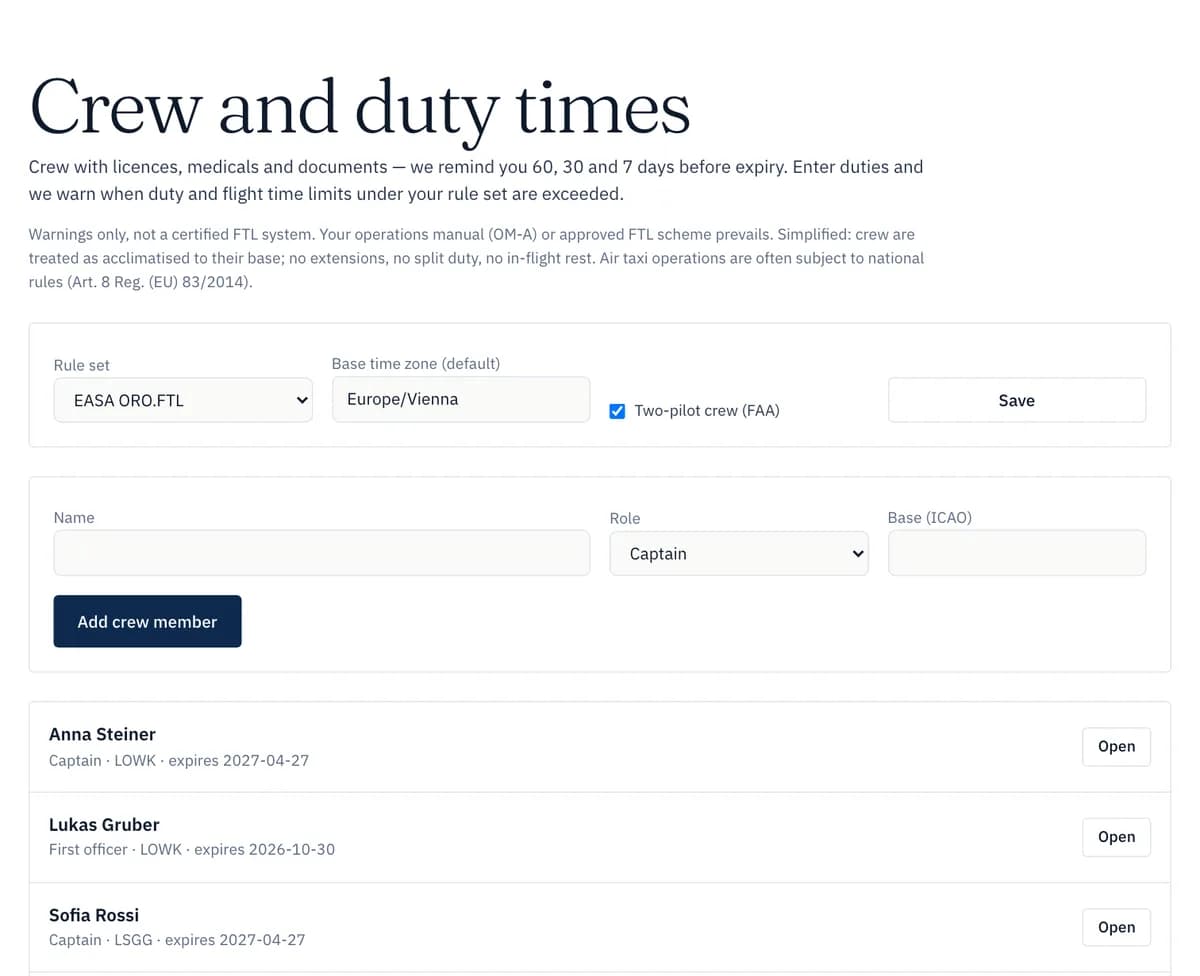
Crew and duty times (FTL)Crew with licences, medicals and documents, expiry reminders and duty time warnings under EASA, UK CAA or FAA Part 135.Details
Add your crew with type ratings, licence, medical class and passport and upload documents. We remind you 60, 30 and 7 days before expiry by email, WhatsApp, Telegram or push.
Enter duties and choose your rule set: EASA ORO.FTL, UK CAA or FAA Part 135. We warn about flight duty periods that are too long (table by report time and sectors), cumulative limits and insufficient rest. These are warnings, not a certified FTL system.
- Contact details and passport encrypted, medical class and expiry only
- Documents private, short-lived links only
- Only admins and operations staff see crew data
PrivJet Ops as a desktop appA dedicated app for Mac, Windows and Linux: system notifications even with the window closed, up to a day of work without a connection, automatic updates.Details
The desktop app shows the same portal as the browser, but runs as its own program with an icon in the menu bar. New requests, bookings and flight operations alerts arrive as system notifications, even with the window closed; you decide whether the app keeps running in the menu bar or quits.
Without a connection you keep working for up to a day: schedule, checklists, crew per flight, flight watch, journey log and flight documents for the next 14 days are stored encrypted on your computer. The app sends your changes once you are back online; if someone else changed the same detail, it asks. Updates are checked at start and every 5 minutes.
- Mac, Windows and Linux, free
- System notifications and menu bar
- Up to a day offline
- Automatic updates
- Sign in as in the portal, also with a passkey
Operator mode in the appRequests, legs, calendar and briefing in the PrivJet app for iOS and Android, with push for new requests.Details
Sign in to the PrivJet app with your operator account and the operator area appears in your profile. There you see matching charter requests with a suitability signal and send a quick quote (price, aircraft from your fleet, note), check your empty legs with views and enquiries, your bookings in progress and the fleet calendar for the next 30 days.
The briefing calculates block time, fuel and fuel stops per flight and shows runways, weather (METAR/TAF), NOTAM closures and sunrise/sunset for every airport. Push messages about new requests, bookings and approvals open the right screen directly. Anything that only exists in the portal (editing the fleet, crew, website, team) opens in the browser, already signed in.
- iOS and Android, free
- Quick quote in seconds
- Briefing with weather and NOTAMs
- Push opens the right screen
- Permissions per team role
Connect
API and webhooks for your own software.
API and webhooks: freeLegs, fleet, calendar, requests and bookings by API, free of charge for your own data.Details
With your own API keys you connect PrivJet Ops to your software: create empty legs, maintain fleet and calendar, read open requests and quote on them, read bookings. Webhooks report events to your systems.
The API is free for your own data, with a limit against abuse. Market data of other providers stays in our paid broker API.
Try it without signing upCalendar sync and CSV exportImport busy times from your calendar, subscribe to PrivJet Ops in your own calendar, export everything as CSV.Details
Connect an iCal link (.ics) per aircraft from your ops software, Google Calendar, Outlook or any other source. Busy times appear in your fleet calendar every 30 minutes. Maintenance is recognised from the title. Requests and empty legs then match your real schedule without keeping two calendars.
The other way round, you subscribe to your fleet calendar, your own empty legs and confirmed bookings through a secret link in Google Calendar, Outlook or Apple Calendar, without customer data. Legs and calendar can be exported as CSV at any time, in the same format as the CSV import.
- iCal import per aircraft, every 30 minutes
- Calendar subscription without customer data
- CSV export of legs and calendar
- Also through the API
PrivJet Ops compared
Feature by feature, with a source and check date for every statement.
| Provider | Type | Cost for operators | See comparison |
|---|---|---|---|
| PrivJet Ops | Free: the client pays the service fee on top (5% on charter requests and 10% on empty legs) | ||
| Avinode | €286/month, prepaid 6 or 12 months | See comparison | |
| Aviapages | from €59/month (1 aircraft) | See comparison | |
| Leon | from €99 per aircraft/month | See comparison | |
| FL3XX | prices not published | See comparison | |
Coming soon
What we are building right now. Every new feature appears immediately under “What’s new”. What’s new
- Sub-charter between operatorsRequest and book other operators’ aircraft: anonymous until payment, handled by PrivJet, the buyer pays a 3% fee on top. Fully built; it starts once the B2B terms have been legally reviewed.
- Online booking on your websiteClients book your empty legs directly on your website: contract with you under your charter terms, you confirm, then the client pays by card straight into your Stripe account, with no PrivJet fee. Fully built; it starts once it has been legally reviewed.
- Two-factor sign-inYour portal access also protected by a code from your authenticator app, with recovery codes for emergencies. Fully built, switching on shortly.
- Direct connection: Leon, FL3XX, Avinode exportLegs and fleet straight from your ops software with your own credentials. Calendars via iCal and CSV already work today.
Frequently asked questions from operators
What does PrivJet Ops cost?
Nothing. There is no subscription, no setup fee and no commission on the flight price. Every feature, including the API for your own data, is free.
Can I try PrivJet Ops first?
Yes, without signing up: the live demo at privjet.net/aircraft-operators/demo shows the real portal with sample data of a fictional operator: requests with quotes, fleet, calendar, quote calculator, flight planning, team, notifications and crew. Nothing is saved there.
How does PrivJet make money?
The client pays us a service fee of 5% on charter requests and 10% on empty legs on the flight price. It is added on top and does not come out of your price. For a €10,000 empty leg the client pays €10,000 to you and €1,000 to PrivJet. For deals between operators (sub-charter, coming soon) the buying operator pays 3 % on top.
When does the client learn who I am, and when do I learn who books?
The client only sees your name, the registration and your bank details after signing the pre-contract and paying the service fee. Requests in the marketplace are anonymous; for a booking you see the client’s name, the passenger list arrives with the payment phase and the phone number once paid.
How do I get paid?
The client pays the flight price directly to you: by bank transfer to your account (you confirm receipt with one click) or by card through your own Stripe account. PrivJet never holds your money.
Does PrivJet review my empty legs?
We review an operator’s first five legs manually; after that they go live immediately. Every leg also passes an automatic check: airports, date, price range, seats per class, duplicates and runway length. We look at unusual legs before they go live.
Which requests do I see in the marketplace?
Every open charter request departing within 2,500 km of your base or operating area for which your fleet has enough seats. We additionally email the best-matching operators directly.
Can I reply to a message directly?
Yes, on WhatsApp and Telegram: “1” confirms (you receive the link to the form, because registration, crew and payment are required), “2” declines, a price such as “12,500 EUR” is recorded as a quote. “STOP” pauses, “START” switches back on.
Is the API really free?
For your own data, yes: empty legs, fleet, calendar, open requests, bookings and webhooks. Only our broker API with market data of other providers is paid.
Start for free
Register your company. After a short review we activate the portal, with team, fleet, legs, requests and API.
Questions? Email us at [email protected].